Export Instagram Data to CSV
Instagram lets you request a copy of your account information. If you choose JSON as the export format, Data.Page can convert those files into CSV so you can inspect the data in Excel or Google Sheets.
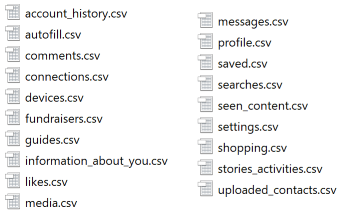
What you may find in an Instagram export
- Comments and likes
- Connections and followers-related data
- Messages, depending on the export options selected
- Searches, profile information, and account activity
Step 1: Request your Instagram data
- Open Instagram or Meta Account Center.
- Choose the option to download or transfer your information.
- Select the Instagram account and the categories you want to export.
- Choose JSON as the format if you plan to convert the files to CSV.
- Create the export and wait for the download to become available.
Instagram's interface can change, so use the official download flow shown in your account if the labels differ.
Step 2: Convert the JSON files
- Download the export ZIP and keep the original archive unchanged.
- Extract the ZIP file if you want to convert individual JSON files.
- Open JSON to CSV.
- Upload the JSON file or ZIP archive.
- Download the CSV or XLSX output and review it in your spreadsheet app.
Privacy note
Instagram exports can contain private messages and personal account history. If you do not want to upload the full archive to the browser tool, convert individual files, use the Desktop App, or contact us with a small non-sensitive sample first.
Need a custom report?
We can help reshape the data into separate files, charts, or a custom Excel workbook. Contact us with the type of Instagram data you want to analyze.