Excel Add-In for JSON Imports
The Data.Page Excel add-in lets the Desktop App import JSON from a URL directly into an Excel worksheet. It is useful when you want a repeatable spreadsheet connected to an API or JSON feed.
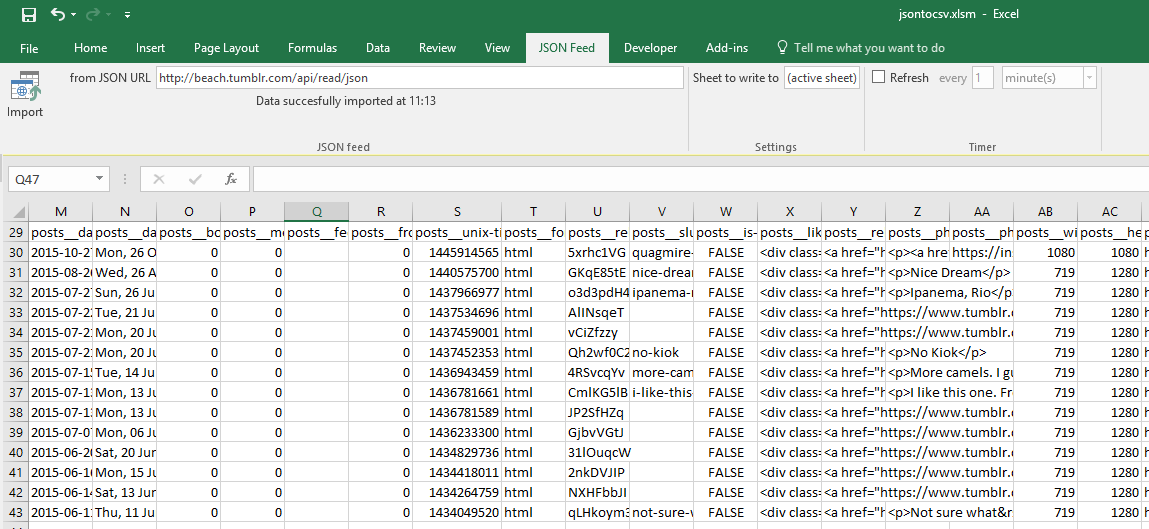
What the add-in does
- Fetches JSON from a URL
- Converts the response into tabular worksheet data
- Can refresh a feed on a timer
- Lets formulas, charts, and reports reference the imported sheet
Best use cases
- Recurring API reports inside Excel
- Internal dashboards that need fresh feed data
- Spreadsheet models built on converted JSON sources
- Teams that prefer local Excel imports over browser uploads
Before installing
The add-in is a supplementary feature of the Data.Page Desktop App. It is intended for Windows Excel use and requires the desktop software to be installed and registered.
Setup overview
- Install and register the Data.Page Desktop App.
- Download the Excel add-in ZIP.
- Unzip it to a stable folder such as
C:\DataPageExcel. - Run the setup batch files included in the archive as instructed.
- Add the folder as a trusted location in Excel.
- Add
DataPage.xlamfrom Excel's Add-ins screen. - Open the JSON Feed tab, paste a JSON URL, and import the data.
Need a custom Excel setup?
If you need custom settings, scheduled refreshes, or a workbook layout built around a specific API, contact us with the source URL and the columns you want in Excel.